[MusicTools dev note] Finding Staff Lines and Barlines in a PDF Page Without OCR
How my sheet music app reads staves, systems and barlines off a PDF page with no OCR and no machine learning, just the rules a musician reads by. Code to run on a real score.
MusicTools can turn your pages by itself, in time with the metronome. To do that, it has to know the shape of the music: how many bars are on each page, and where the repeat signs send you back. For a while, that meant setting it up by hand for every song. Then, in early October, I taught the app to read it off the page the moment a PDF is imported.
There’s no OCR in it, no machine learning, and no server. It reads the pixels of the page with a few rules any musician would recognize, and it all fits in the phone.
What happened: a song that’s ready the moment it arrives
Import a PDF, and while the app says “Reading page 1 of 6…”, each page is read once for its staves, systems and barlines. The song comes out with its Song Form already set up: every system a line, every barline the edge between two bars, the repeat signs and the 1st and 2nd ending brackets marked, and the order it all plays in worked out. The repeats are played out, the music goes back to an earlier page when it should, and the 1st ending is skipped the second time through. On my test emulator, a page takes just under a second, and half of that is drawing the page.
Why it works: music is drawn with straight lines
A page of sheet music is mostly straight lines, and they follow strict habits.
Staff lines are the only long horizontal lines on the page, and they come five at a time, evenly spaced. A beam or a tie is short, and a table or a box of text doesn’t come in evenly spaced fives. So the reader looks for rows where ink runs a good way across the page, and keeps them when five in a row are the same distance apart.
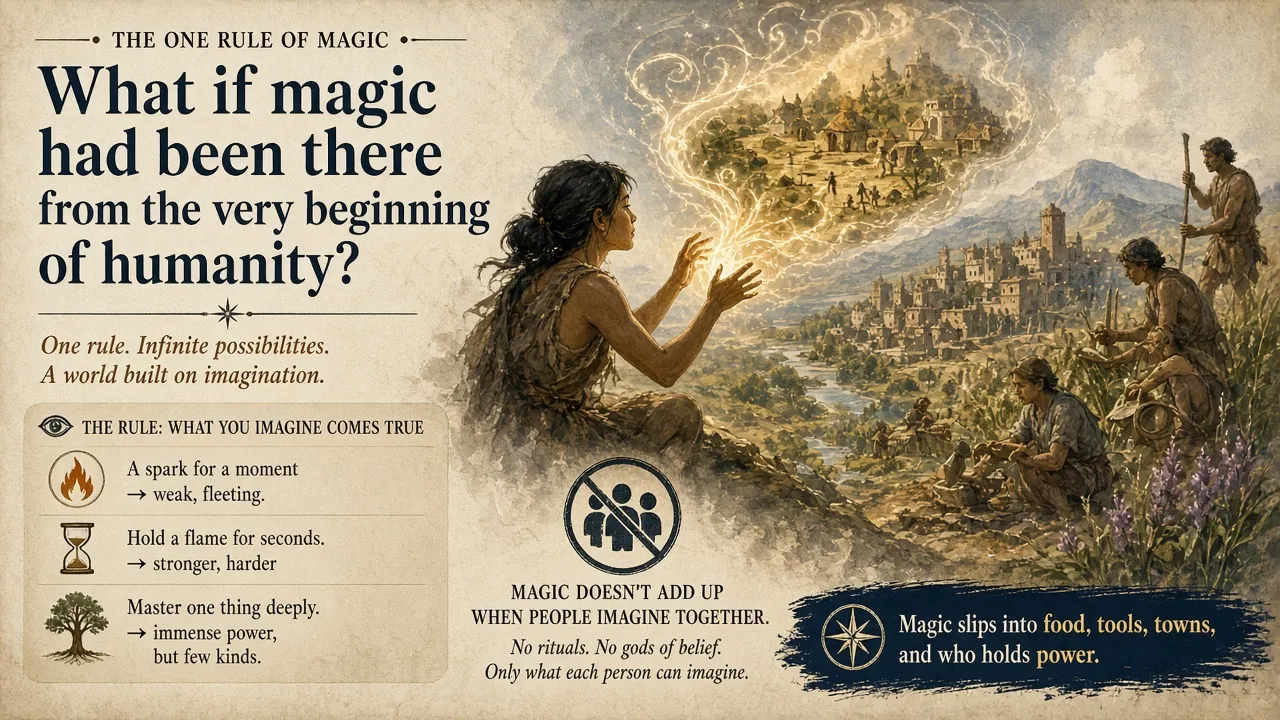
Staves joined by a vertical line at the left are read together as one system, like the two staves of a piano part.
A barline is a vertical line through the whole system. That rule matters more than it looks, because a page is full of vertical lines: every note’s stem is one. A stem stays inside its own staff, while a barline in piano music runs from the top of the right hand’s staff to the bottom of the left hand’s.
Everything is measured in staff spaces, the distance between two staff lines, so the size of the page doesn’t matter. The app draws each page 1600 pixels wide in grey and reads it in plain TypeScript, and the results come out the same at any width from about 1400 pixels up.
How I built it: the lines that only look like barlines
The real reader is fussier than “a line through the system”. In at least one of the staves, a barline has to end exactly on the outer staff lines, or run on into the next staff, with nothing attached at its ends. That’s what tells it apart from a stem, which has a notehead or a beam on one end, from the digits of a time signature, and from a half note whose stem happens to reach across the whole staff. A notehead printed against the middle of a barline is allowed, because crowded engraving does that. A repeat sign is a double line with two dots in the middle spaces of the staff, and the bracket of a 1st or 2nd ending is a thin line above the system, hooked down at its start, over a barline.
Just as important is knowing when to say no. A wrong reading makes the app turn pages at the wrong moment, which is worse than not reading at all. So when a PDF doesn’t read as one continuous piece of music, MusicTools leaves it exactly as it was imported: a page with no staves or a skewed scan, exercises where every line ends in a double barline, a method book with boxes of text between the music. The Song Form editor will still read such a sheet as a starting point, and it shows the lines it isn’t sure of in red. Tempo, time signatures, and jumps like D.S. al Coda aren’t read at all; those you set yourself.
Try it yourself: read a real score in your browser
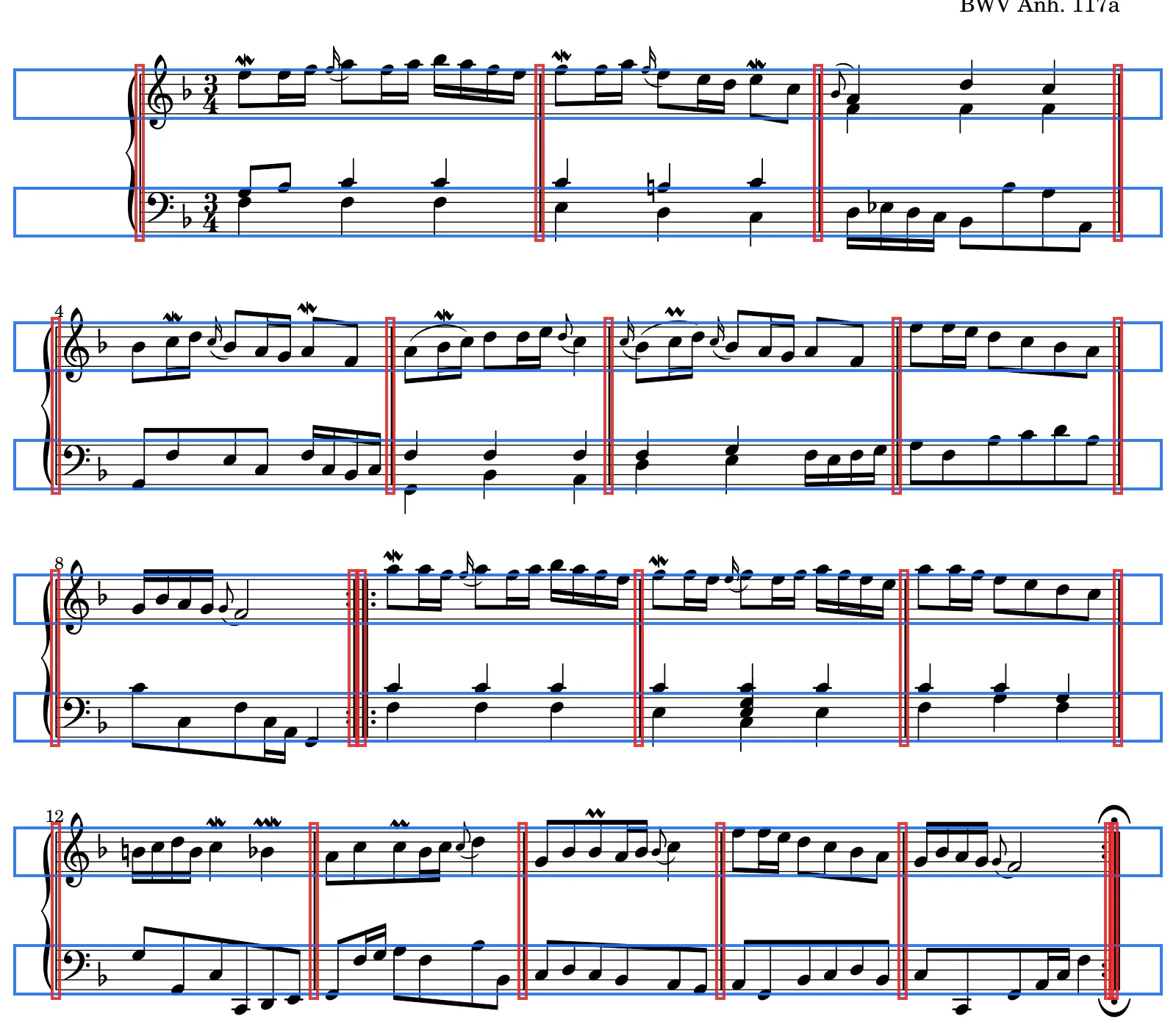
This code does the core of it on a real page: page 1 of Bach’s Polonaise in F, BWV Anh. 117a, engraved by the Mutopia Project and in the public domain, at the 1600-pixel width MusicTools reads pages at. Open the developer console on this page (F12 in Chrome or Edge on Windows, Option-⌘-J in Chrome on a Mac) and paste it. It finds the staves, systems and barlines, and shows the page in the corner with what it found marked; click the page to close it.
const img = new Image();
img.src = '/media/dev/bach-polonaise-page-1.png';
await img.decode();
const W = img.width, H = img.height;
const canvas = document.createElement('canvas');
canvas.width = W;
canvas.height = H;
const g = canvas.getContext('2d');
g.drawImage(img, 0, 0);
const pixels = g.getImageData(0, 0, W, H).data;
const ink = (x, y) => pixels[(y * W + x) * 4] < 160; // dark enough to be ink

// 1. Staff lines: rows with ink across much of the page. Neighbouring rows are one line.
const lines = [];
for (let y = 0; y < H; y++) {
  let count = 0;
  for (let x = 0; x < W; x++) if (ink(x, y)) count++;
  if (count < W * 0.4) continue;
  const last = lines.at(-1);
  if (last && y - last.bottom <= 2) last.bottom = y;
  else lines.push({ top: y, bottom: y });
}

// 2. Staves: five lines in a row, evenly spaced.
const staves = [];
for (let i = 0; i + 4 < lines.length; ) {
  const ys = lines.slice(i, i + 5).map((line) => (line.top + line.bottom) / 2);
  const space = (ys[4] - ys[0]) / 4;
  if (ys.slice(1).every((y, k) => Math.abs(y - ys[k] - space) < space * 0.2)) {
    staves.push({ top: Math.round(ys[0]), bottom: Math.round(ys[4]), space });
    i += 5;
  } else i += 1;
}

// Where each run of columns inked all the way from row y0 to row y1 starts.
function solidColumns(y0, y1) {
  const xs = [];
  let inRun = false;
  for (let x = 0; x < W; x++) {
    let solid = true;
    for (let y = y0; y <= y1 && solid; y++) solid = ink(x, y);
    if (solid && !inRun) xs.push(x);
    inRun = solid;
  }
  return xs;
}

// 3. Systems: staves joined by a vertical line (a piano's two staves) are read together.
const systems = [];
for (const staff of staves) {
  const last = systems.at(-1);
  if (last && solidColumns(last.at(-1).top, staff.bottom).length > 0) last.push(staff);
  else systems.push([staff]);
}

// 4. Barlines: lines through the whole system. A stem stays inside its own staff.
console.log(`${lines.length} long lines, ${staves.length} staves (staff space ${staves[0].space.toFixed(1)} px), ${systems.length} systems`);
systems.forEach((system, i) => {
  const top = system[0].top, bottom = system.at(-1).bottom;
  const inOneStaff = system.map((s) => solidColumns(s.top, s.bottom).length);
  system.barlines = solidColumns(top, bottom);
  console.log(`system ${i + 1}: lines through one staff ${inOneStaff.join(' and ')}, ` +
    `through the whole system ${system.barlines.length}, at x = ${system.barlines.join(', ')}`);
});

// Mark what was found, and show it in the corner. Click it to close.
g.lineWidth = 4;
for (const system of systems) {
  g.strokeStyle = 'rgba(29, 111, 242, 0.9)';
  for (const s of system) g.strokeRect(20, s.top - 6, W - 40, s.bottom - s.top + 12);
  g.strokeStyle = 'rgba(230, 40, 40, 0.9)';
  const top = system[0].top, bottom = system.at(-1).bottom;
  for (const x of system.barlines) g.strokeRect(x - 5, top - 12, 10, bottom - top + 24);
}
canvas.style.cssText =
  'position:fixed;top:12px;right:12px;z-index:99999;width:min(480px,90vw);' +
  'border:1px solid #ccc;border-radius:8px;background:#fff;box-shadow:0 4px 24px rgba(0,0,0,.2)';
canvas.title = 'Click to close';
canvas.onclick = () => canvas.remove();
document.body.append(canvas);
My console said:
45 long lines, 8 staves (staff space 13.5 px), 4 systems
system 1: lines through one staff 4 and 6, through the whole system 4, at x = 190, 734, 1113, 1521
system 2: lines through one staff 7 and 11, through the whole system 5, at x = 76, 531, 828, 1220, 1521
system 3: lines through one staff 6 and 7, through the whole system 6, at x = 75, 480, 492, 869, 1230, 1521
system 4: lines through one staff 9 and 18, through the whole system 7, at x = 76, 427, 711, 980, 1228, 1509, 1515
Of the 45 long lines, 40 belong to the eight staves. The other five are the frame of the license box at the foot of the page; they aren’t five evenly spaced lines, so they never become a staff.
The barlines are the interesting part. Look at the left hand’s staff in the last system: 18 vertical lines cross it from top to bottom, and most of them are stems. Only 7 run through the whole system, and those are exactly the barlines. Count the bars between them and you get 3, 4, 4 and 5: all 16 bars of the piece. The two lines at 480 and 492 in the third system are the two thick strokes of the repeat sign in the middle, and 1509 and 1515 are the two lines of the closing repeat sign.
What I’d keep
Find the rule a musician reads by, and make the code exactly that strict. A staff line isn’t a dark row; it’s one of five evenly spaced dark rows. A barline isn’t a vertical line; it’s a vertical line through the whole system. And when a page doesn’t follow the rules, say no instead of guessing, because in the middle of a piece, a page that turns at the wrong moment is worse than one that doesn’t turn at all.
MusicTools dev note
All episodes 7 so far
The metronome
Getting the score in
- Finding Staff Lines and Barlines in a PDF Page Without OCR you're reading this
- Straightening a Photo of Sheet Music with Four Corners (Homography)
Turning pages hands-free
Sound: tuner, recording and analysis
Extras: notes from my dev setup