[MusicTools dev note] Straightening a Photo of Sheet Music with Four Corners (Homography)
Four corners and a homography straighten a photographed page, but its proportions still come out wrong. How my score app works out a page's real shape, with code to try.
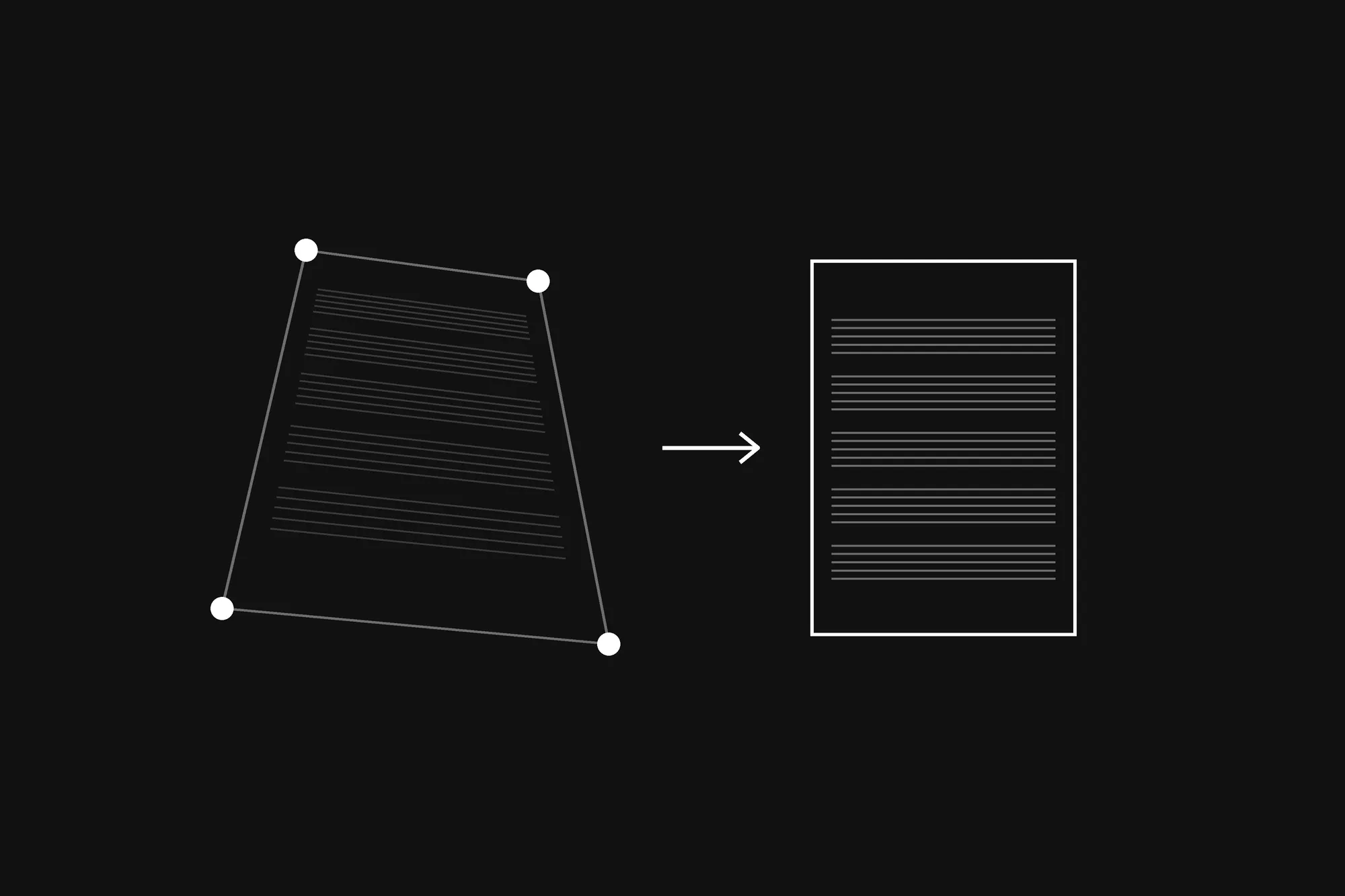
The first songs I made from photos of paper scores made me dizzy to read. Every page came out a different height, and the music looked squashed. Each page had been straightened by its four corners, and yet the score as a whole was wrong.
It took me a while to see why: straightening a page and getting its shape right are two different problems. Four corners solve the first. The second needs a little help from the camera.
What happened: from PDFs to photos of paper
MusicTools started out reading PDFs. But a lot of music only exists on paper, so in October the app learned to make a song from photos and scans too. A scan finds the page’s corners by itself. For a photo from your library, you drag four handles onto the page’s corners, and the app pulls the page out of the photo, straight.
The trouble was in the song as a whole: no two of its pages came out the same height.
Why four corners are enough to straighten a page
A flat page seen from any angle is related to the same page seen straight on by a single 3×3 matrix, called a homography. It maps every point of one onto the other, and it has eight unknowns. Each corner you place gives two equations, one for x and one for y, so four corners give eight equations, exactly enough to solve for it. Then every pixel of the straightened page is fetched from wherever the matrix says it sits in the photo.
That part worked from the start. The problem was the size of the page I asked for.
Why the page still came out squashed
The corners tell you where the page is in the photo, but not how wide it is compared to how tall. My first version took the size from the photo itself: the average length of the top and bottom edges for the width, and of the left and right edges for the height.
A page photographed at an angle is foreshortened, though. Hold the phone near the bottom of the page and the top is farther away, so the whole page looks shorter than it is. Averaged edges give you that shorter page, squashed, and each photo, taken at a slightly different angle, gives a slightly different shape. That was the dizzying score: pages of different heights, with the music pressed flat.
How I fixed it: the perspective knows the shape
The same perspective that hides the page’s shape can give it back. How fast the page’s edges converge says how far it’s tilted, and once you know the tilt, you know its true proportions, as long as you also know the camera’s focal length. It’s an old trick: Zhengyou Zhang and Li-wei He worked it out for photographing whiteboards.
MusicTools doesn’t know which camera took your photo, so it assumes a phone’s main camera, whose focal length is about 0.76 of the photo’s longer side (24 to 29 mm in 35 mm terms). If that guess is a few percent off, the page’s proportions come out a percent or two off, which nobody will see. Then all the pages of a song get one page size, taken from the song’s own pages rather than from A4, so turning a page never changes the size of the music.
Try it yourself: straighten this photo
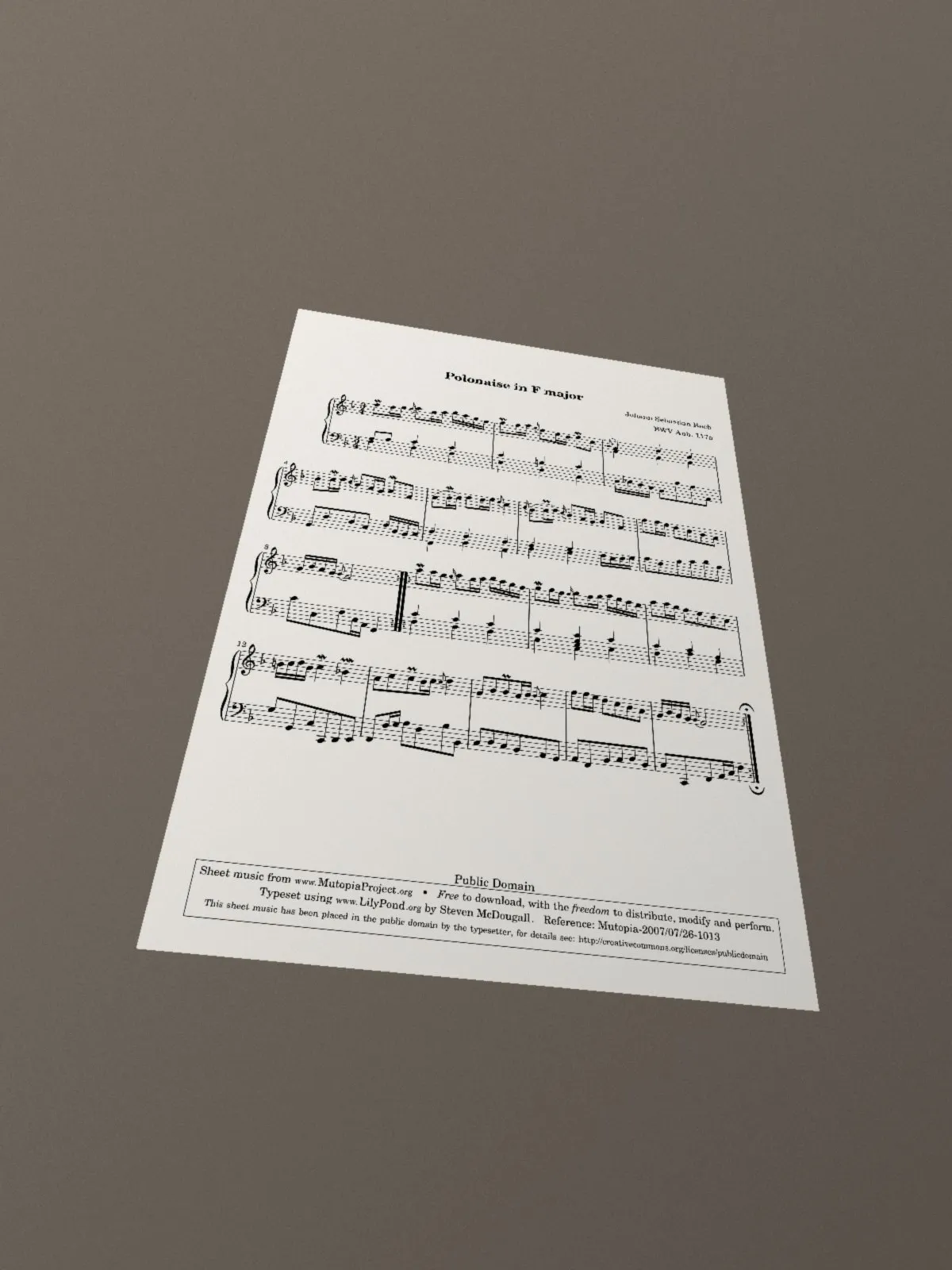
The photo above isn’t a real photo. It’s the public-domain page from the last dev note, rendered the way an upright phone with a 26 mm lens would see it lying on a desk. That way we know the right answer: it’s A4 paper, 210 by 297 mm, so its width over its height is 0.707.
Open the developer console on this page (F12 in Chrome or Edge on Windows, Option-⌘-J in Chrome on a Mac) and paste the code below. It straightens the photo twice, once with the averaged edges and once with the proportions worked out from the perspective, and shows both side by side in the corner. Click them to close.
const photo = new Image();
photo.src = '/media/dev/polonaise-photo.jpg';
await photo.decode();
const source = document.createElement('canvas');
source.width = photo.width;
source.height = photo.height;
source.getContext('2d').drawImage(photo, 0, 0);
const pixels = source.getContext('2d').getImageData(0, 0, photo.width, photo.height).data;

// The page's corners on the photo, clockwise from the top left. In the app you drag them into place.
const corners = [[376, 389], [913, 477], [1033, 1274], [171, 1195]];

// The 3×3 matrix that takes each `from` point to its `to` point: eight equations, eight unknowns.
function homography(from, to) {
  const rows = from.flatMap(([x, y], i) => {
    const [u, v] = to[i];
    return [[x, y, 1, 0, 0, 0, -u * x, -u * y, u], [0, 0, 0, x, y, 1, -v * x, -v * y, v]];
  });
  for (let c = 0; c < 8; c++) { // Gauss-Jordan elimination
    let p = c;
    for (let r = c + 1; r < 8; r++) if (Math.abs(rows[r][c]) > Math.abs(rows[p][c])) p = r;
    [rows[c], rows[p]] = [rows[p], rows[c]];
    for (let r = 0; r < 8; r++) {
      if (r === c) continue;
      const k = rows[r][c] / rows[c][c];
      for (let j = c; j < 9; j++) rows[r][j] -= k * rows[c][j];
    }
  }
  return [...rows.map((row, i) => row[8] / row[i]), 1];
}

// The page cut out of the photo and pulled straight, `height` pixels tall and `aspect` times as wide.
function straighten(aspect, height = 800) {
  const width = Math.round(height * aspect);
  const h = homography([[0, 0], [width, 0], [width, height], [0, height]], corners);
  const out = document.createElement('canvas');
  out.width = width;
  out.height = height;
  const image = out.getContext('2d').createImageData(width, height);
  for (let y = 0; y < height; y++) {
    for (let x = 0; x < width; x++) {
      const w = h[6] * x + h[7] * y + h[8];
      const sx = Math.round((h[0] * x + h[1] * y + h[2]) / w);
      const sy = Math.round((h[3] * x + h[4] * y + h[5]) / w);
      const from = (sy * photo.width + sx) * 4, to = (y * width + x) * 4;
      for (let k = 0; k < 4; k++) image.data[to + k] = pixels[from + k];
    }
  }
  out.getContext('2d').putImageData(image, 0, 0);
  return out;
}

// The page's real width over height, from how its edges converge, for a lens of focal length f (in px).
function trueAspect([tl, tr, br, bl], f) {
  const [a, b, c, d] = [tl, tr, br, bl].map(([x, y]) => [x - photo.width / 2, y - photo.height / 2, 1]);
  const cross = (u, v) => [u[1] * v[2] - u[2] * v[1], u[2] * v[0] - u[0] * v[2], u[0] * v[1] - u[1] * v[0]];
  const dot = (u, v) => u[0] * v[0] + u[1] * v[1] + u[2] * v[2];
  const kTop = dot(cross(a, c), d) / dot(cross(b, c), d);
  const kLeft = dot(cross(a, c), b) / dot(cross(d, c), b);
  const top = b.map((v, i) => kTop * v - a[i]); // the top edge in 3D, up to scale
  const left = d.map((v, i) => kLeft * v - a[i]); // the left edge
  const length2 = (n) => (n[0] ** 2 + n[1] ** 2) / f ** 2 + n[2] ** 2;
  return Math.sqrt(length2(top) / length2(left));
}

const side = (p, q) => Math.hypot(p[0] - q[0], p[1] - q[1]);
const [tl, tr, br, bl] = corners;
const averaged = (side(tl, tr) + side(bl, br)) / (side(tl, bl) + side(tr, br));
const f = 0.76 * Math.max(photo.width, photo.height); // a phone's main camera, as a share of the longer side
const real = trueAspect(corners, f);
console.log(`width/height from averaged sides: ${averaged.toFixed(3)}`);
console.log(`width/height from the perspective: ${real.toFixed(3)} (A4 paper is ${(210 / 297).toFixed(3)})`);

// Both, side by side: averaged sides on the left, true proportions on the right. Click to close.
const box = document.createElement('div');
box.style.cssText =
  'position:fixed;top:12px;right:12px;z-index:99999;display:flex;gap:8px;padding:8px;' +
  'background:#111;border-radius:10px;cursor:pointer';
for (const page of [straighten(averaged), straighten(real)]) {
  page.style.cssText = 'height:min(420px,70vh);width:auto';
  box.append(page);
}
box.onclick = () => box.remove();
document.body.append(box);
My console said:
width/height from averaged sides: 0.861
width/height from the perspective: 0.696 (A4 paper is 0.707)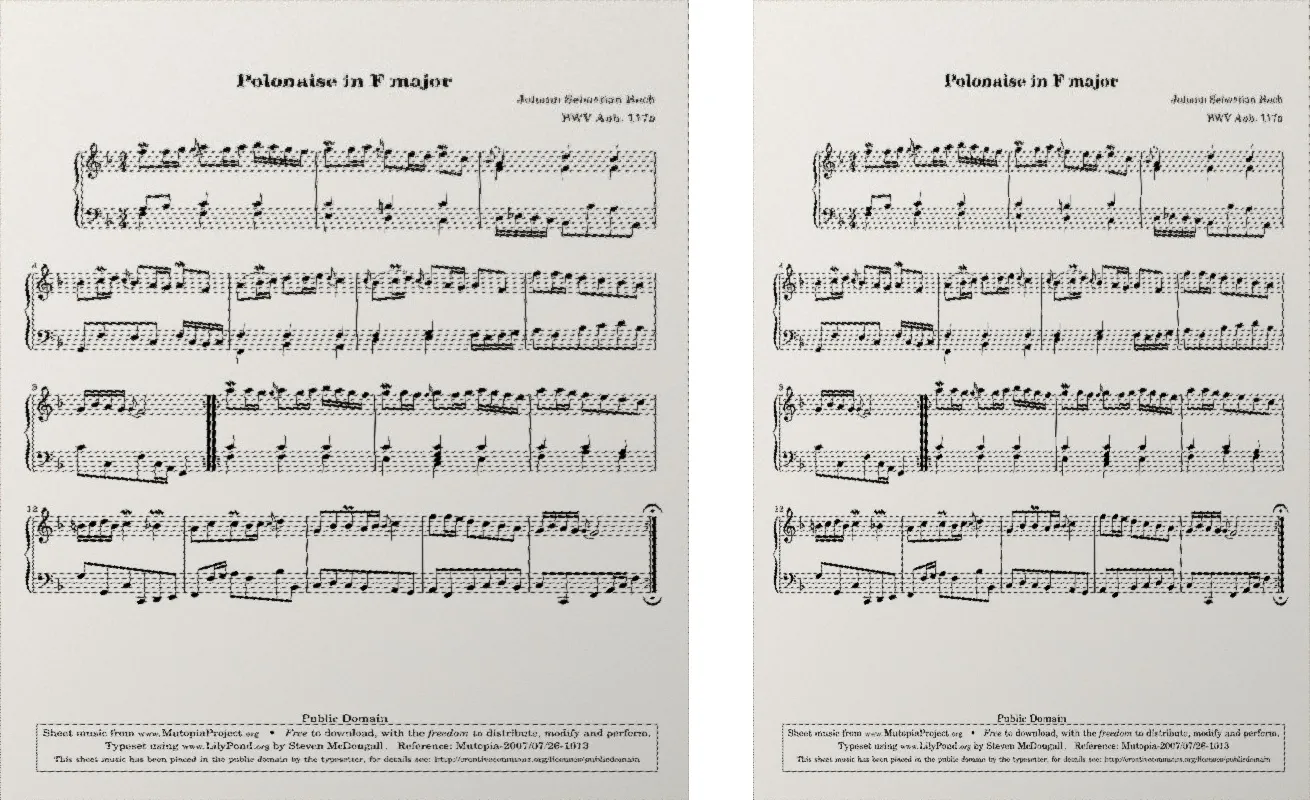
The averaged edges make the page 22% too wide for its height: that’s the squashed score. The perspective gets within 1.6% of A4, even though the code guessed the lens wrong. The photo was rendered with a lens of 0.72 of the longer side, and the code assumes 0.76. Change the 0.76 to 0.72 and the answer comes out at 0.708; each 5% you get the lens wrong moves the answer by about 1.7%.
What I’d keep
A photo hides a page’s shape behind its perspective, and the same perspective gives the shape back, if you ask it. Four corners can’t fix a page that won’t lie flat, though, like a thick book bowing toward its spine. That takes reading the music itself, and it’s the next story in this series.
MusicTools dev note
All episodes 7 so far
The metronome
Getting the score in
- Finding Staff Lines and Barlines in a PDF Page Without OCR
- Straightening a Photo of Sheet Music with Four Corners (Homography) you're reading this
Turning pages hands-free
Sound: tuner, recording and analysis
Extras: notes from my dev setup